Home / Our products / Shaheen Video analytics
Shaheen™ Clearer visibility. Better operations. A platform that turns camera scenes into operational indicators and actionable alerts, helping service, operations and safety teams see what needs their attention.
Visual detection Clear alerts Event context Team response
Demo facility › Security operations ● Systems connected Operations overview Monitoring center The full picture. A timely response.
23 October 2026 Connected cameras 12 / 12 All monitoring points
Alerts to review 02 Awaiting review
Today's events 24 In this demo scenario
Resolved 22 Reviewed and closed
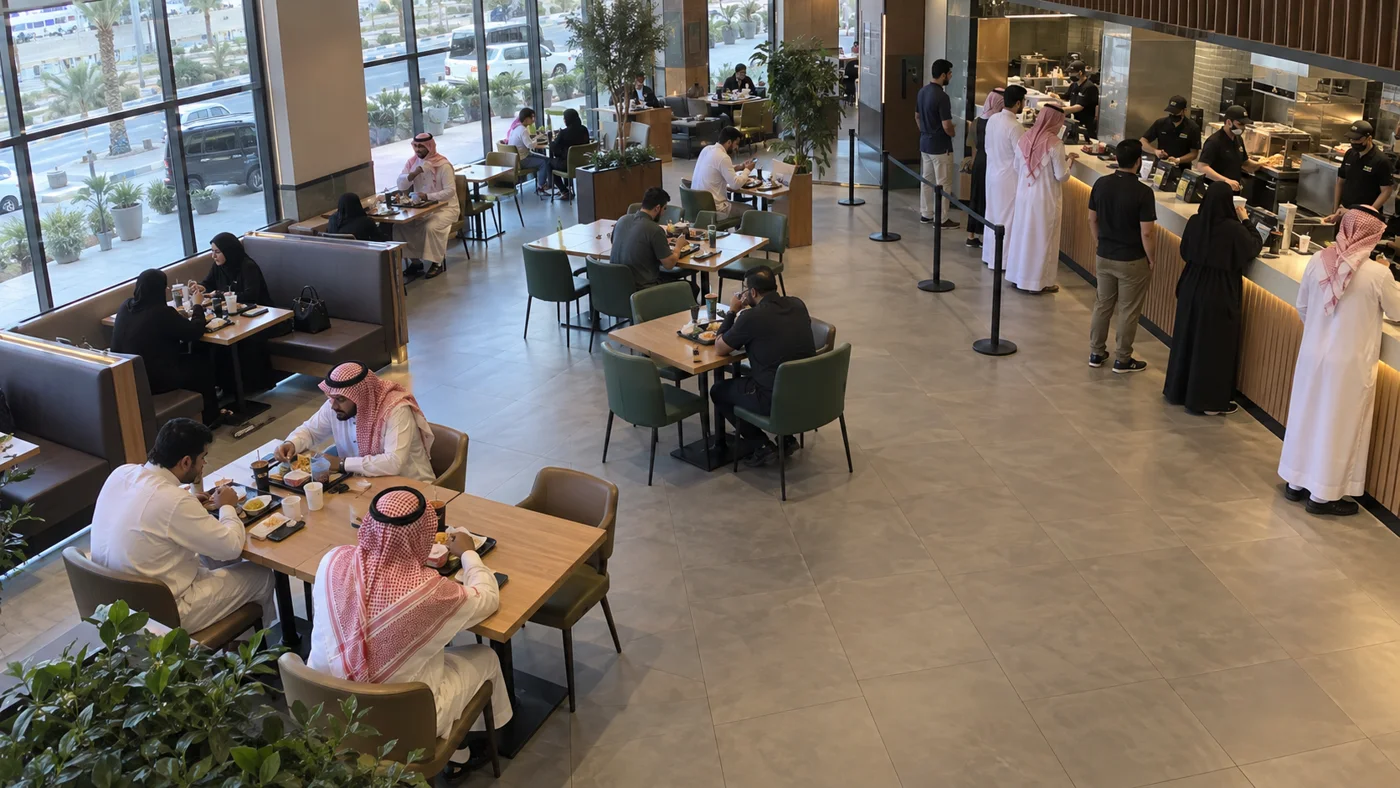
CAM 01 · Dining area Demo
Guest • 00:42 Dwell 04:12 h Guest Guest
23 OCT 2026 · 14:32:08 AI VISION
Illustrative detection result Dining and table occupancy Estimate people counts and occupied tables within defined zones.
Recent alerts 02
High 14:32:08 Restricted area entry North gate Review event →
Medium 14:28:41 Stopped vehicle Employee parking Review event →
Medium 14:21:16 Monitoring line crossed Service entrance Review event →
High 14:12:30 Restricted area entry North gate Review event →
Detection and response Alert log Every event, with context and response status.
23 October 2026 Search alerts PriorityAll priorities HighMedium 04
Reference Event and location Detected at Priority Status View SH-1048 Restricted area entry North gate 14:32:08 High New ↗
SH-1047 Stopped vehicle Employee parking 14:28:41 Medium Under review ↗
SH-1046 Monitoring line crossed Service entrance 14:21:16 Medium Resolved ↗
SH-1045 Restricted area entry North gate 14:12:30 High Resolved ↗
No matching alerts.
SH-1048 Restricted area entry North gate
New CAM 01 · Dining area Demo
Guest • 00:42 Dwell 04:12 h Guest Guest
23 OCT 2026 · 14:32:08 AI VISION
14:32:08 Demo scene Response timeline Scene analysis against the detection rule
Location, time and priority attached
Awaiting acknowledgement
A feature inside Shaheen Event search Ask about an event, then open its frame and details.
Find the event with a question. Try a question about your selected use case.
Show today's dining occupancy events →
Result from demo data Illustrative search using demo data. Scope Shaheen with our team Beyond a single scene. Explore options that can be configured or developed within an agreed scope.
Density heatmaps Explore congestion and visitor flow over time.
Discuss activation → Multi-site management Bring sites and team permissions into one workspace.
Discuss activation → Access-system integration Match zone entry with permissions when integrated.
Discuss activation → Alert and task integration Connect alerts to your team’s response workflow.
Discuss activation → Custom reports and dashboards Choose indicators and reports that fit your operation.
Discuss activation → Detection and escalation rules Set zones, thresholds and alert recipients.
Discuss activation → Event-archive search Scope recording sources, retention and search.
Discuss activation → Deployment and privacy options Discuss deployment, access and retention requirements.
Discuss activation → Activation is scoped after compatibility and requirements review; these options are not enabled in the demo.
Operational alert Table needs attention Main dining area · CAM 01
Site indicators 4 available bays A clearer view of site status
Shaheen interface preview · Illustrative data Explore Shaheen
An experience shaped around your operation. Choose your sector and use case. Explore the scene, alert and follow-up in one workspace.
Choose your sector Restaurants & cafés Kitchens & operational safety Malls & retail Parking & vehicle flow Schools & education Warehouses & factories 02 / Use cases
Choose a use case Switch cases to see the relevant analysis and alert.
Restaurants & cafés Know when your venue fills up and where service slows down. A view of dining areas, queues and tables to help managers allocate staff and improve the guest experience.
Estimate people counts and occupied tables within defined zones.
Alert when table dwell exceeds 4 hours
Notify the floor supervisor to check on the guest
Guide guests to available tables and plan staff allocation.
Open this alert → Extensions and integrationsOptions for your scope ↗ Demo facility › Security operations ● Systems connected Operations overview Monitoring center The full picture. A timely response.
23 October 2026 Connected cameras 12 / 12 All monitoring points
Alerts to review 02 Awaiting review
Today's events 24 In this demo scenario
Resolved 22 Reviewed and closed
CAM 01 · Dining area Demo
Guest • 00:42 Dwell 04:12 h Guest Guest
23 OCT 2026 · 14:32:08 AI VISION
Illustrative detection result Dining and table occupancy Estimate people counts and occupied tables within defined zones.
Recent alerts 02
High 14:32:08 Restricted area entry North gate Review event → Medium 14:28:41 Stopped vehicle Employee parking Review event → Medium 14:21:16 Monitoring line crossed Service entrance Review event → High 14:12:30 Restricted area entry North gate Review event → Detection and response Alert log Every event, with context and response status.
23 October 2026 Search alerts PriorityAll priorities HighMedium 04
Reference Event and location Detected at Priority Status View SH-1048 Restricted area entry North gate 14:32:08 High New ↗ SH-1047 Stopped vehicle Employee parking 14:28:41 Medium Under review ↗ SH-1046 Monitoring line crossed Service entrance 14:21:16 Medium Resolved ↗ SH-1045 Restricted area entry North gate 14:12:30 High Resolved ↗
No matching alerts.
SH-1048 Restricted area entry North gate
New CAM 01 · Dining area Demo
Guest • 00:42 Dwell 04:12 h Guest Guest
23 OCT 2026 · 14:32:08 AI VISION
14:32:08 Demo scene Response timeline Scene analysis against the detection rule
Location, time and priority attached
Awaiting acknowledgement
A feature inside Shaheen Event search Ask about an event, then open its frame and details.
Find the event with a question. Try a question about your selected use case.
Show today's dining occupancy events → Result from demo data Illustrative search using demo data. Scope Shaheen with our team Beyond a single scene. Explore options that can be configured or developed within an agreed scope.
Activation is scoped after compatibility and requirements review; these options are not enabled in the demo.
Illustrative scenes and data for exploring the product. Demo examples do not define Shaheen’s full scope.
Try it at your site
How do we get started? 01 Choose the use case Define what your team needs to monitor.
02 Check camera compatibility Verify compatibility and scene clarity.
03 Run a pilot and evaluate Review alerts with your team before expanding.

 Product demo workspaceIllustrative data